Terminal Git Client with Visual Diffs
Forge TUI connects Git review to project navigation. Work with changed files without switching to a separate desktop application.
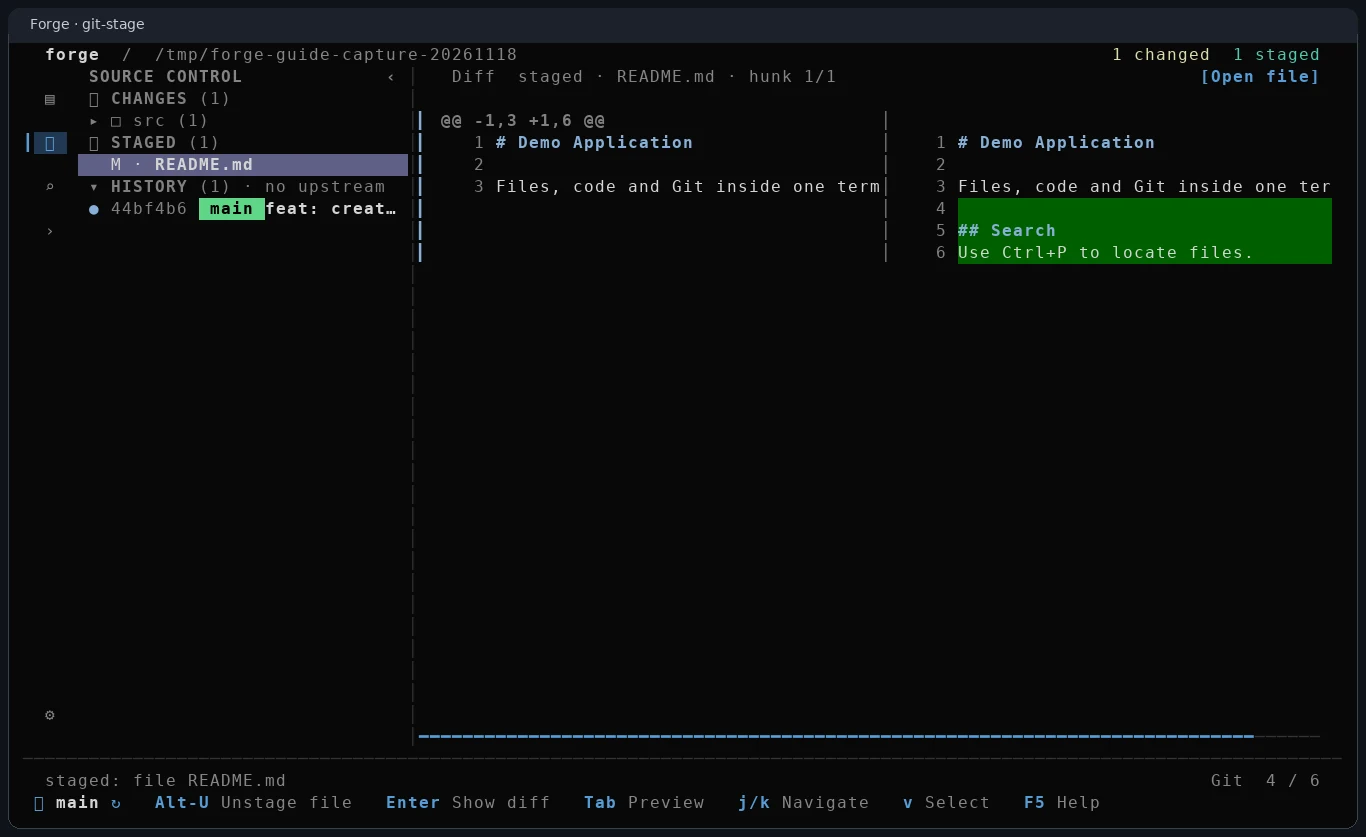
Review before staging
Open Git with F2, select a changed file and inspect its diff with surrounding code. Navigate to Files to examine other source files and use search to locate references.
Stage and commit
Use the Git panel's contextual actions to stage or unstage selected changes. Review staged content, open the commit dialog, enter a message and commit only what you intend.
History and branch workflows
Browse commit history, blame, branches and stashes. Use the built-in shell for advanced Git commands or automation. Check F4 for effective shortcuts.
Who it is for
Useful for developers working over SSH, in WSL or locally who want visual Git review and file access in one TUI. Forge does not replace every Git command.
Get started
Explore related workflows
- Forge TUI vs Lazygit: Files and Git in One Terminal
- Forge TUI vs Yazi: Terminal File Manager and Git Workspace
- A Terminal Workspace for Codex CLI | Forge TUI
- A Terminal Workspace for Claude Code | Forge TUI
- Terminal File Manager with Mouse Support | Forge TUI
- Integrated Terminal for a Git and File Workspace | Forge TUI